But wait,if they already have functions why do they need edge functions?
why the extra parts
Supabase Functions: Your PostgreSQL Toolbox
Supabase functions, also known as database functions, are essentially PostgreSQL stored procedures. They are executable blocks of SQL code that can be called from within SQL queries.
Edge Functions: Beyond the Database
In contrast, Edge functions are server-side TypeScript functions that run on the Deno runtime. They are similar to Firebase Cloud Functions but offer a more flexible and open-source alternative.
Supabase: A PostgreSQL Platform
Beyond its role as an open-source alternative to Firebase, Supabase has evolved into a comprehensive PostgreSQL platform. It provides first-class support for PostgreSQL functions, integrating them seamlessly into its built-in utilities and allowing you to create and manage custom functions directly from the Supabase dashboard.
Structure of a basic postgres functon
sql
1CREATEFUNCTION my_function()RETURNSintAS $$
2BEGIN
3RETURN42;
4END;
5$$ LANGUAGEsql;
Breakdown:
CREATE FUNCTION: This keyword indicates that we're defining a new function.
my_function(): This is the name of the function. You can choose any meaningful name you prefer.
RETURNS int: This specifies the return type of the function. In this case, the function will return an integer value.
AS $$: This begins the function body, enclosed within double dollar signs ($$) to delimit it.
BEGIN: This marks the start of the function's executable code.
RETURN 42;: This statement specifies the value that the function will return. In this case, it's the integer 42.
END;: This marks the end of the function's executable code.
$$ LANGUAGE sql;: This specifies the language in which the function is written. In this case, it's SQL.
Purpose:
This function defines a simple SQL function named my_function that returns the integer value 42. It's a basic example to demonstrate the structure and syntax of a function definition in PostgreSQL.
Key points to remember:
You can replace my_function with any desired function name.
The return type can be any valid data type, such as text, boolean, date, or a user-defined type.
The function body can contain complex logic, including conditional statements, loops, and calls to other functions.
The $$ delimiters are used to enclose the function body in a language-independent manner.
Postgres functions can also be called by postgres TRIGGERS which are like functions but react to specific events like insert, update or delete on a table
to execute this function
sql
1SELECT my_function();
to list this function
sql
1SELECT
2 proname AS function_name,
3 prokind AS function_type
4FROM pg_proc
5WHERE proname ='my_function';
to drop this function
sql
1DROPFUNCTION my_function();
Supabase postgres functions
Built-in functions
Supabase makes use of postgres functions to perform certain tasks within your database.
short list of exampales includes
sql
1-- list all the supabase functions
2SELECT
3 proname AS function_name,
4 prokind AS function_type
5FROM pg_proc;
6
7-- filter for the session supabase functions function
8SELECT
9 proname AS function_name,
10 prokind AS function_type
11FROM pg_proc
12WHERE proname ILIKE'%session%';
13
14-- selects the curremt jwt
15select auth.jwt()
16
17-- select what role is callig the function (anon or authenticated)
18select auth.role();
19
20-- select the session user
21select session_use;
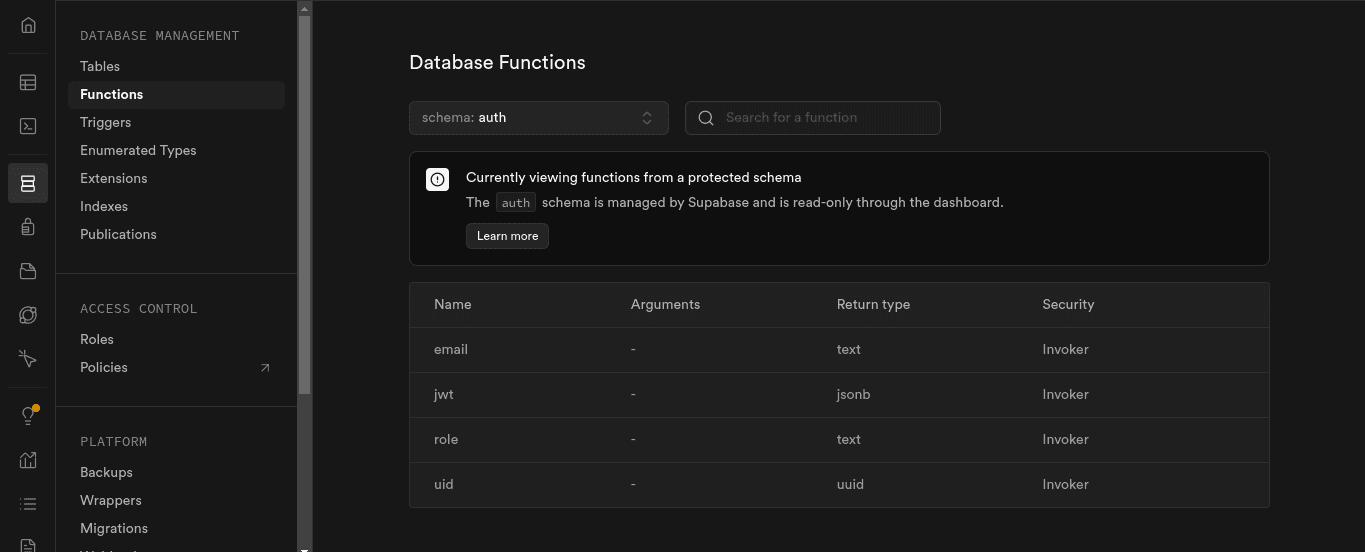
Supabase functions view on the dashboard To view some of these functions in Supabase, you can check under database > functions
supabase functions view on the dashboard
Useful Supabase PostgreSQL Functions
Creating a user_profile Table on User Signup
Supabase stores user data in the auth.users table, which is private and should not be accessed or modified directly. A recommended approach is to create a public users or user_profiles table and link it to the auth.users table.
While this can be done using client-side SDKs by chaining a create user request with a successful signup request, it's more reliable and efficient to handle it on the Supabase side. This can be achieved using a combination of a TRIGGER and a FUNCTION.
sql
1-- create the user_profiles table
2CREATETABLE user_profiles (
3 id uuid PRIMARYKEY,
4FOREIGNKEY(id)REFERENCES auth.users(id),
5 name text,
6 email text
7);
8
9-- create a function that returns a trigger on auth.users
Supabase functions can be invoked using the rpc function. This is especially useful for writing custom SQL queries when the built-in PostgreSQL APIs are insufficient, such as calculating vector cosine similarity using pg_vector.
```sql create or replace function match_documents ( query_embedding vector(384), match_threshold float, match_count int ) returns table ( id bigint, title text, body text, similarity float ) language sql stable as $$ select documents.id, documents.title, documents.body, 1 - (documents.embedding <=> query_embedding) as similarity from documents where 1 - (documents.embedding <=> query_embedding) > match_threshold order by (documents.embedding <=> query_embedding) asc limit match_count; $$;
typescript
1and call it client side
ts const { data: documents } = await supabaseClient.rpc('match_documents', { query_embedding: embedding, // Pass the embedding you want to compare match_threshold: 0.78, // Choose an appropriate threshold for your data match_count: 10, // Choose the number of matches })
typescript
1**Improved Text:**
2
3**Filtering Out Columns**
4
5To prevent certain columns from being modified on the client, create a simple function that triggers on every insert. This function can omit any extra fields the user might send in the request.
6
7
sql -- check if user with roles authenticated or anon submitted an updatedat column and replace it with the current time , if not (thta is an admin) allow it CREATE or REPLACE function public.omit_updated__at () returns trigger as $$ BEGIN IF auth.role() IS NOT NULL AND auth.role() IN ('anon', 'authenticated') THEN NEW.updated_at = now(); END IF; RETURN NEW; END; $$ language plpgsql; ```
Summary
With a little experimentation, you can unlock the power of Supabase functions and their AI-powered SQL editor. This lowers the barrier to entry for the niche knowledge required to get this working.
Why choose Supabase functions?
Extend Supabase's API: Supabase can only expose so much through its API. Postgres, however, is a powerful database. Any action you can perform with SQL statements can be wrapped in a function and called from the client or by a trigger.
Reduce the need for dedicated backends: Supabase functions can fill the simple gaps left by the client SDKs, allowing you to focus on shipping.
Avoid vendor lock-in: Supabase functions are just Postgres. If you ever need to move to another hosting provider, these functionalities will continue to work.