Back to blogs
Blog
Writing in public
Longer posts — published here first, then cross-posted to Dev.to with a canonical URL back to this site.
Blog
Longer posts — published here first, then cross-posted to Dev.to with a canonical URL back to this site.
Back to blogs
Back to blogs
Postgithub, rest, api, react
Intro Github is a remote source control solution that can act as a source of truth and...
Date published

Why You Might Still Pick Next.js Over TanStack Start From a TanStack Start...

A complete theme management system for React applications with SSR support! ✨ 🌟...

Modify your nextauth client and add a callbacks section that will get the access token from the...
Github is a remote source control solution that can act as a source of truth and remote backup for your local versioning system, in this case Git. It makes development and collaboration when working in small to large codebases and has a handy web client that offers you all the tools . But as a developer you're bound to want more or a very specific layout that's not supported in their native implementation , and hats where APIs come in , Github has one of the best APIs i've tinkered with .this tutorial will start off with the REST implementation then we'll switch to their GraphQL api final project
{% embed https://github.com/tigawanna/gitpals %}
for starters i'd recommend setting up an api testing environment and before we do that we'll also need a personal access token
then we'll an api client like postman or it's alternatives and set the token in the header as such
remember to space the keyword Bearer to the actual token and also add the application/json as shown below
 and for example hitting the endpoint https://api.github.com/user will give you back the currently logged in user and with that set up you can now experiment with queries even and make sure they work before using them .
Once sure of that we can start setting up react ,in this case i used axios with react-query
and the above query would look something like this
first we make the query function
1export const getAuthedUserDetails=async(token:string,url:string)=>{2// const token = "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"3 const res = await axios({4 method: 'get',5 url: url,6 headers: {7 Authorization: `Bearer ${token}`,8 "Content-Type": "application/json"9 },10 })11 // console.log("response == ",res)1213 const user = res.data14 // console.log("authed user == ",user)15 return user16}
then we pass it into react-query
1 const query = useQuery(["main-user", token], () =>2 getAuthedUserDetails(token, authed_user)3 );4 const user = query.data as MainAuthedUser;
type casting query.data to MainAuthedUser to give us the type checking when using this in the code. I generated the types manually by pasting the json response to json-to-ts
And viola.
this works fine but you'll notice we're barely using 30% of the json returned which is where GraphQL shines by only requesting what we need it also has more data because of it;s flexible nature
Let's take the user query for example
1 "login": "tigawanna",2 "id": 72096712,3 "node_id": "MDQ6VXNlcjcyMDk2NzEy",4 "avatar_url": "https://avatars.githubusercontent.com/u/72096712?v=4",5 "gravatar_id": "",6 "url": "https://api.github.com/users/tigawanna",7 "html_url": "https://github.com/tigawanna",8 "followers_url": "https://api.github.com/users/tigawanna/followers",9 "following_url": "https://api.github.com/users/tigawanna/following{/other_user}",10 "gists_url": "https://api.github.com/users/tigawanna/gists{/gist_id}",11 "starred_url": "https://api.github.com/users/tigawanna/starred{/owner}{/repo}",12 "subscriptions_url": "https://api.github.com/users/tigawanna/subscriptions",13 "organizations_url": "https://api.github.com/users/tigawanna/orgs",14 "repos_url": "https://api.github.com/users/tigawanna/repos",15 "events_url": "https://api.github.com/users/tigawanna/events{/privacy}",16 "received_events_url": "https://api.github.com/users/tigawanna/received_events",17 "type": "User",18 "site_admin": false,19 "name": "Dennis kinuthia",20 "company": null,21 "blog": "https://next-portfolio-zeta-two.vercel.app/",22 "location": "Nairobi Kenya ",23 "email": "denniskinuthiaw@gmail.com",24 "hireable": null,25 "bio": "React GraphQL Node Go",26 "twitter_username": null,27 "public_repos": 49,28 "public_gists": 0,29 "followers": 11,30 "following": 39,31 "created_at": "2020-09-29T17:03:46Z",32 "updated_at": "2022-09-01T21:26:46Z",33 "private_gists": 0,34 "total_private_repos": 6,35 "owned_private_repos": 6,36 "disk_usage": 47541,37 "collaborators": 0,38 "two_factor_authentication": false,39 "plan": {40 "name": "free",41 "space": 976562499,42 "collaborators": 0,43 "private_repos": 1000044 }
This is quite the response and you'll notice that it has the followers and following url which will point you to an endpoint with the list of them
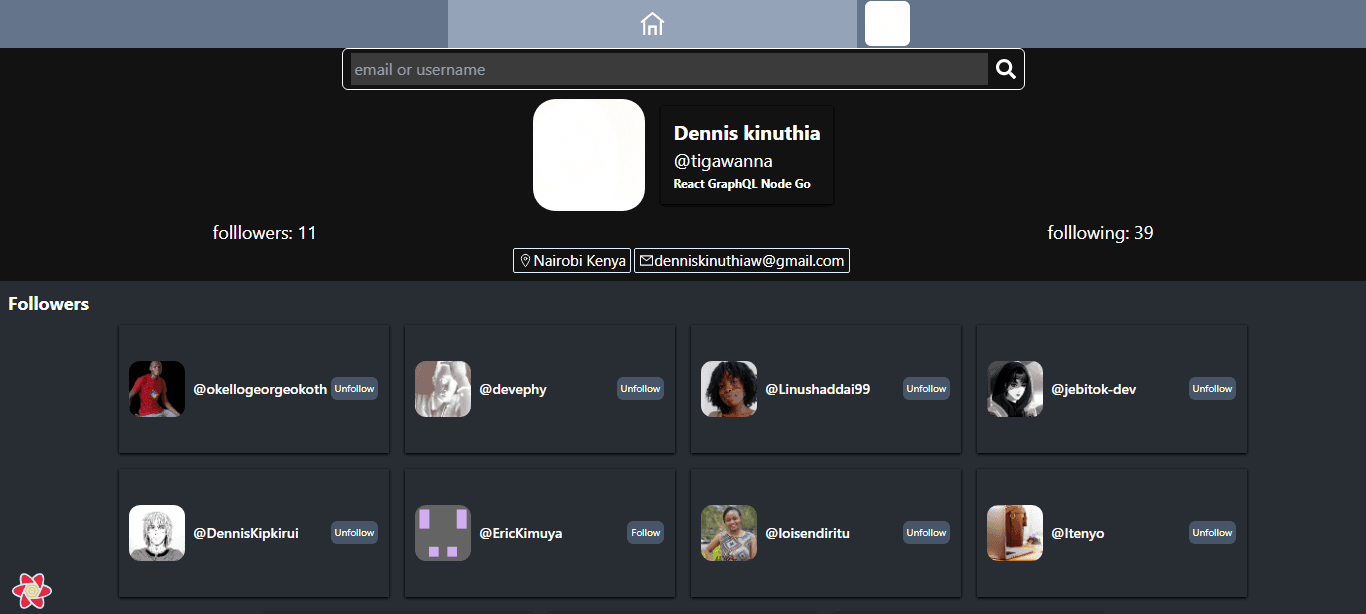
My objective was to have something like this , because i wanted this app to make discovering other users and their projects easier

but the response for one follower looks like this
1 {2 "login": "Harmon758",3 "id": 9403740,4 "node_id": "MDQ6VXNlcjk0MDM3NDA=",5 "avatar_url": "https://avatars.githubusercontent.com/u/9403740?v=4",6 "gravatar_id": "",7 "url": "https://api.github.com/users/Harmon758",8 "html_url": "https://github.com/Harmon758",9 "followers_url": "https://api.github.com/users/Harmon758/followers",10 "following_url": "https://api.github.com/users/Harmon758/following{/other_user}",11 "gists_url": "https://api.github.com/users/Harmon758/gists{/gist_id}",12 "starred_url": "https://api.github.com/users/Harmon758/starred{/owner}{/repo}",13 "subscriptions_url": "https://api.github.com/users/Harmon758/subscriptions",14 "organizations_url": "https://api.github.com/users/Harmon758/orgs",15 "repos_url": "https://api.github.com/users/Harmon758/repos",16 "events_url": "https://api.github.com/users/Harmon758/events{/privacy}",17 "received_events_url": "https://api.github.com/users/Harmon758/received_events",18 "type": "User",19 "site_admin": false20 },
The issue is it doesn't have information on whether I am following the user in order to know whether to show a follow or unfollow button. so i used this work around
query 1 : to find if user is following another user , returns success if yes and 404 if false
1export const getIsUserFollowingMe=async(token:string,me:string,them:string)=>{2 const res = await axios({3 method: 'get',4 url:`https://api.github.com/users/${me}/following/${them}`,5 headers: {6 Authorization: `Bearer ${token}`,7 "Content-Type": "application/json"8 },9 })10 // //console.log("response == ",res)11 if(res.status === 204){12 return true13 }14 return false15 }
query 2 - the main query that will go through the array of followers urls and for each one pause to make an async call to check follow status and insert it into the final object then push it into an array
1export const getUserWithFollowingDetails = async (token: string, url: string, username: string) => {2 //console.log("user with following details ", username, url);3 let followers:any=[]4 const users = await getAuthedUserFollowers(token,url) as Follower[]5 for await (const user of users) {6 // //console.log("user with following details ",username,user.login);7 //@ts-ignore8 user.following_me = await getIsUserFollowingMe(token, username, user.login)910 .catch((e)=>{})11 followers.push(user)12 }13 return followers14 }
Not only is this technique noticeably slower but will also burn through your rate limit very fast , and given the point of the app is to go deep into user profiles and fall deeper as you check who's following who and what repos they're working on you'll get timed out really fast
You could side step all of this and just remove the feature and only fetch those details if the follower card is clicked on or switch to the GraphQL api which unlocks some very handy features