3- Firebase is a "serverless" solution for hosted software as a service backend utilities for most of your web needs ,inthis tutorial we'll use firestore ,authentication, cloud functions and their emulator site foor local testing. they even have a hosting solution for static websites like the example we're about to put together
4
5
6- React-query-firebase :is a react package that wraps around react-query to offer us custom hooks for firebase operations
7
8
9-(optional) Tailwind is a utility-first CSS framework
10
11
12We'll be building a simple project manager which simulates a worKplace where employees will identify newprohect ideas and seek approval ,once approved the project will need funding once funded it will need to be marked done after being acconplished
13
14#Ui setup
15
16for simplicity just clone the starter files for the Ui section
npm i firebase npm install react-router-dom@6 npm i react-query npm i @react-query-firebase/firestore npm i @react-query-firebase/auth npm i @react-query-firebase/functions
typescript
1
2
3we'll first set-up the routing
4
import React from 'react'; import './App.css'; import { Routes, Route } from "react-router-dom"; import { BrowserRouter } from 'react-router-dom'; import { Toolbar } from './components/Toolbar/Toolbar'; import { Project } from './components/Projects/Project'; import { Home } from './components/Home/Home';
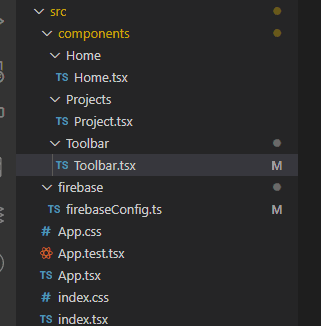
2our folder structure should look something like this after adding a component and firebase directory inside the src folder. then creating a directory for Home.tsx and Project.tsx inside the components and firebaseConfig.ts
3
4
5To setup firebase you/ll first need to visit [the firebase console](https://console.firebase.google.com/?pli=1), after the seyup process you'll recieve your own firebaseConfig json object to use below
6
7firebaseComfig.tsx:
import { initializeApp } from "firebase/app"; import { getFirestore } from "firebase/firestore" import { GoogleAuthProvider,getAuth} from "firebase/auth";
export const db = getFirestore(); export const provider = new GoogleAuthProvider(); export const auth = getAuth(app) ```
Image description
starter files for the Ui section `git clone https://github.com/tigawanna/starter-files-for-project-manager.git ` a firebase project with firestore,authentication and functions will also need to be created set up process and run npm i to get dependancies